

Azure as a State Machine, dogfooding Tags
In the post, I am going to introduce a concept which will allow you to greatly up your Infrastructure as Code game, by using Azure as a State Machine!
One of the typical challenges when deploying ARM templates, is the sheer number of parameters which we find as a requirement to complete a deployment; which as you will appreciate gets considerably harder as we target many environments.
There are a number of methods to address this, including the use of Parameter files or Continuous deployment variables; each with their own challenges.
Putting Tags to Work
Tags can be applied at both the level of the subscription and resources.
For the purpose of this post we will use a scenario of the recovery vault. At the subscription level, we will apply 2 tags to identity the vault we will target for the resources, and then on the actual resource we will add a tag to identity the recovery policy we wish to be applied.
| resource | tag | value |
|---|---|---|
| subscription | recoveryVault | p-vault-001 |
| subscription | recoveryVaultRG | p-vault |
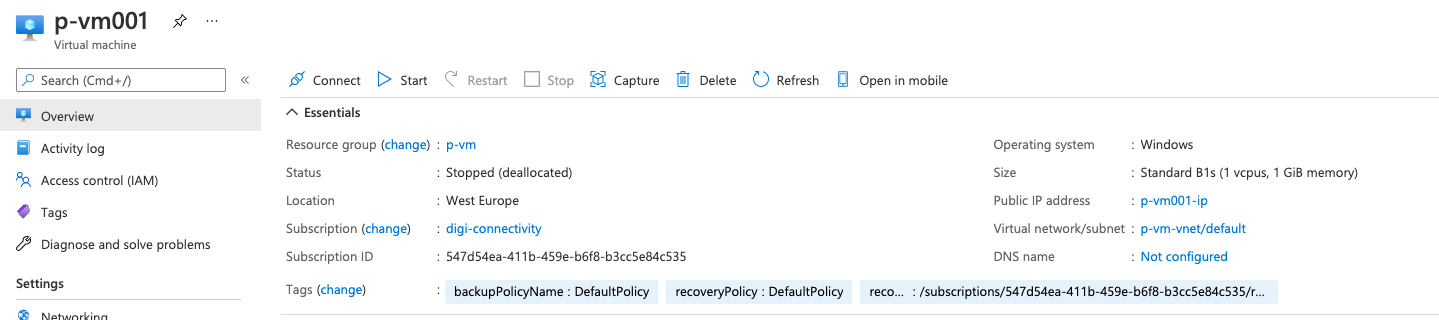
| resource | recoveryPolicy | DefaultPolicy |
Subscription Level Tags
With these Tags applied, we will have something similar to the following at the subscription level:
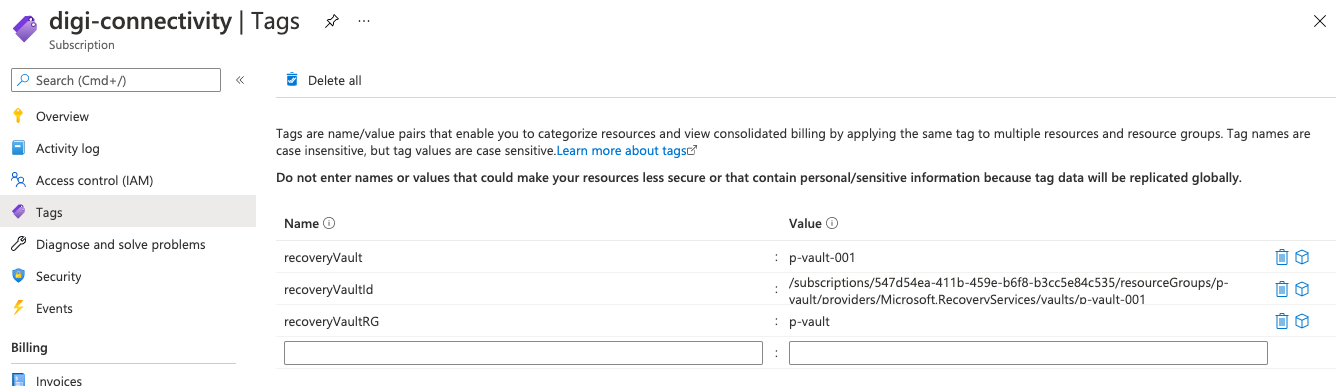
In my lab the subscription is /subscriptions/547d54ea-411b-459e-b6f8-b3cc5e84c535
Resource Tags
And the VM called p-vm001, which will represent the resource which we are going to monitor the tag on in my lab will be in the same subscription (for permissions to be simplified), hosted in a resource group called p-vm
The full resource ID of this VM in the lab is /subscriptions/547d54ea-411b-459e-b6f8-b3cc5e84c535/resourceGroups/p-vm/providers/Microsoft.Compute/virtualMachines/p-vm001
Azure Resource Manager Magic
Now, we have all the parts of this environment in place, we will create an ARM template, which simply looks up the values of these tags for us, and to illustrate how it works, it will return the values as outputs.
Using the Custom Template Deployment in Azure Portal, paste the sample template below
json ShowHide 43 lines
{
  "$schema": "https://schema.management.azure.com/schemas/2019-04-01/deploymentTemplate.json#",
  "contentVersion": "1.0.0.0",
  "parameters": {
    "sourceResourceId": {
      "type": "String",
      "defaultValue": "/subscriptions/547d54ea-411b-459e-b6f8-b3cc5e84c535/resourceGroups/p-vm/providers/Microsoft.Compute/virtualMachines/p-vm001",
      "metadata": {
        "description": "The resource ID of the resource we wish to look up a tag from."
      }
    }
  },
  "variables": {
    "referenceSubscriptionTagsResourceId": "[concat('/subscriptions/', subscription().subscriptionId, '/providers/Microsoft.Resources/tags/default')]",
    "referenceResourceTagsResourceId": "[concat(parameters('sourceResourceId'),'/providers/Microsoft.Resources/tags/default')]",
     "referenceTagsApi": "2020-06-01"
  },
  "resources": [
  ],

  "outputs": {
    "recoveryVaultId": {
      "type": "String",
      "value": "[resourceId(subscription().subscriptionId,  reference(variables('referenceSubscriptionTagsResourceId'), variables('referenceTagsApi')).tags.recoveryVaultRG ,'Microsoft.RecoveryServices/vaults',  reference(variables('referenceSubscriptionTagsResourceId'), variables('referenceTagsApi')).tags.recoveryVault) ]"
    },
    "recoveryPolicyId": {
      "type": "string",
      "value": "[concat( resourceId(subscription().subscriptionId,  reference(variables('referenceSubscriptionTagsResourceId'), variables('referenceTagsApi')).tags.recoveryVaultRG ,'Microsoft.RecoveryServices/vaults',  reference(variables('referenceSubscriptionTagsResourceId'), variables('referenceTagsApi')).tags.recoveryVault), '/backupPolicies/', reference(variables('referenceResourceTagsResourceId'), variables('referenceTagsApi')).tags.recoveryPolicy )]"
    },
    "subscriptionRecoveryVaultRGTag": {
      "type": "string",
      "value": "[reference(variables('referenceSubscriptionTagsResourceId'), variables('referenceTagsApi')).tags.recoveryVaultRG]"
    },
    "subscriptionRecoveryVaultTag": {
      "type": "string",
      "value": "[reference(variables('referenceSubscriptionTagsResourceId'), variables('referenceTagsApi')).tags.recoveryVault]"
    },
    "resourceRecoveryPolicyTag": {
      "type": "String",
      "value": "[reference(variables('referenceResourceTagsResourceId'), variables('referenceTagsApi')).tags.recoveryPolicy]"
    }
  }
}
Next, Check your going to deploy to the lab environment subscription, and resource group where we have the test VM which we will check the tag on
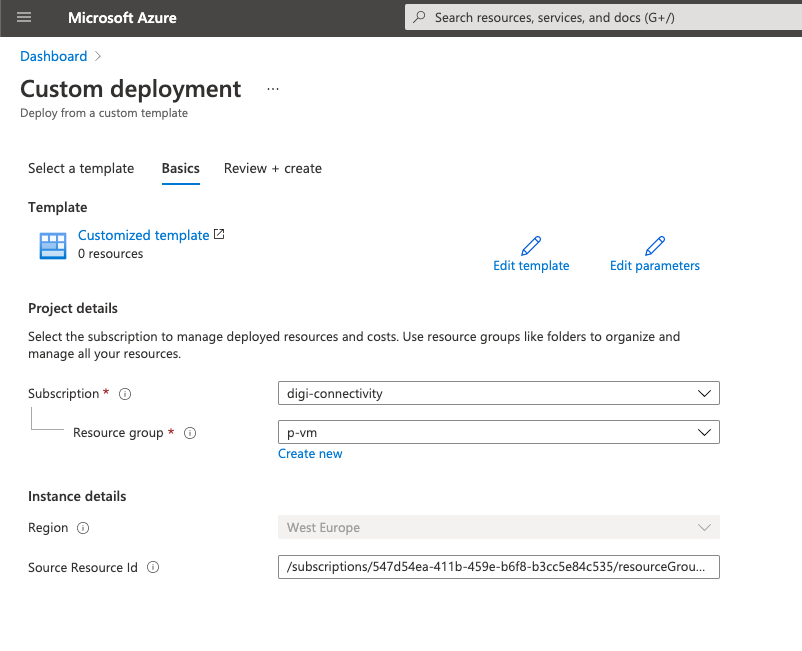
Click on the Review and Create Button, allow the validation to complete, and then click again on Create
As this is simply a reference deployment, it will complete instantly, so next we can check the output from the deployment
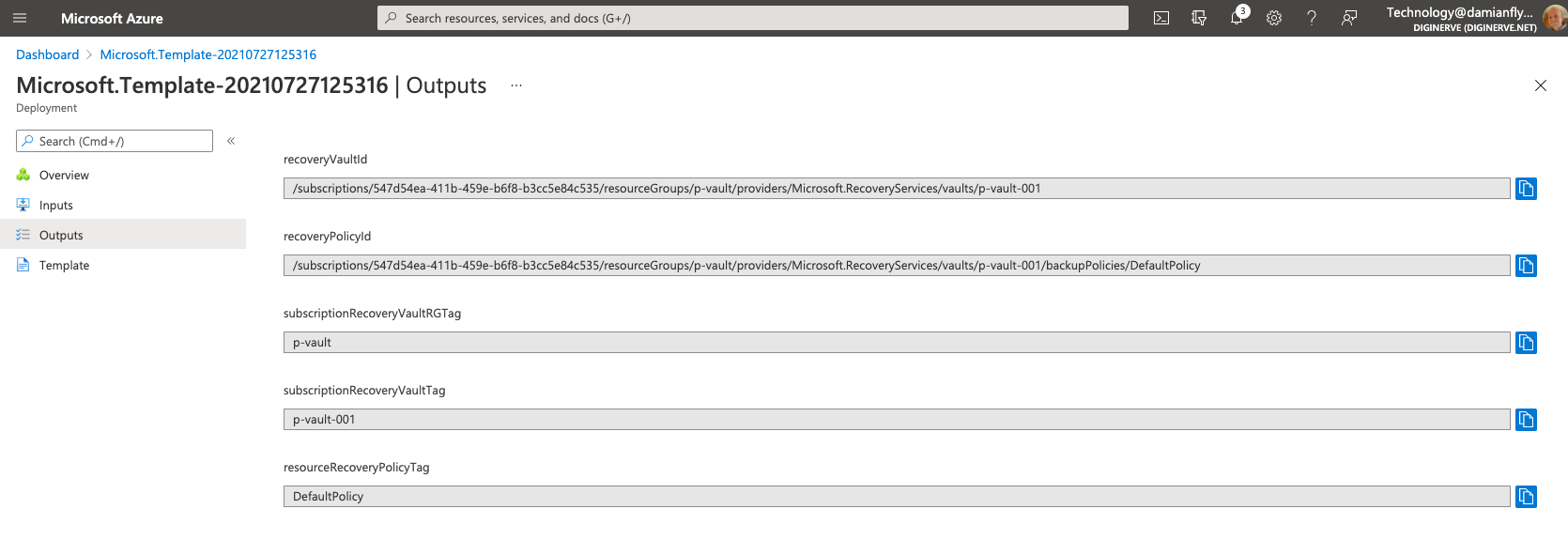
Now, we should see all the tag values which we set in the lab!
Behind the Scenes - Explain the Template
So, How?
The following ARM JSON uses the reference function to lookup the data we care about
We establish to variables which we use to point at both the tags provider for the current subscription referenceSubscriptionTagsResourceId and also, the Resource ID of the lab VM referenceResourceTagsResourceId
We also will need a provider API version, while looking up the values of these tags, so we also can use a variable referenceTagsApi to store this.
json ShowHide 5 lines
"variables": {
    "referenceSubscriptionTagsResourceId": "[concat('/subscriptions/', subscription().subscriptionId, '/providers/Microsoft.Resources/tags/default')]",
    "referenceResourceTagsResourceId": "[concat(parameters('sourceResourceId'),'/providers/Microsoft.Resources/tags/default')]",
     "referenceTagsApi": "2020-06-01"
  }
Subscription Tags
Now, the magic. In the outputs, we simply reference the resource ID of the Tag provider for the subscription, with its API version, naming the tag as the last parameter, for example recoveryVaultRG
[reference(variables('referenceSubscriptionTagsResourceId'), variables('referenceTagsApi')).tags.recoveryVaultRG]
We do exactly the same for the subscription Recovery Vault tag called recoveryVault
[reference(variables('referenceSubscriptionTagsResourceId'), variables('referenceTagsApi')).tags.recoveryVault]
Resource tags
In a very similar manner we can reference the tags on the resource, returning the recoveryPolicy tag value
[reference(variables('referenceResourceTagsResourceId'), variables('referenceTagsApi')).tags.recoveryPolicy]
Getting Creative
Finally, with some concatenation, we can now build resource identifiers dynamically so that we an combine the values of the tags to reference recovery vaults, and recovery policies
json ShowHide 8 lines
    "recoveryVaultId": {
      "type": "String",
      "value": "[resourceId(subscription().subscriptionId,  reference(variables('referenceSubscriptionTagsResourceId'), variables('referenceTagsApi')).tags.recoveryVaultRG ,'Microsoft.RecoveryServices/vaults',  reference(variables('referenceSubscriptionTagsResourceId'), variables('referenceTagsApi')).tags.recoveryVault) ]"
    },
    "recoveryPolicyId": {
      "type": "string",
      "value": "[concat( resourceId(subscription().subscriptionId,  reference(variables('referenceSubscriptionTagsResourceId'), variables('referenceTagsApi')).tags.recoveryVaultRG ,'Microsoft.RecoveryServices/vaults',  reference(variables('referenceSubscriptionTagsResourceId'), variables('referenceTagsApi')).tags.recoveryVault), '/backupPolicies/', reference(variables('referenceResourceTagsResourceId'), variables('referenceTagsApi')).tags.recoveryPolicy )]"
    },
In this case our lab produced the following references
| Output Key | Output value |
|---|---|
| recoverVaultId | /subscriptions/547d54ea-411b-459e-b6f8-b3cc5e84c535/resourceGroups/p-vault/providers/Microsoft.RecoveryServices/vaults/p-vault-001 |
| recoveryPolicyId | /subscriptions/547d54ea-411b-459e-b6f8-b3cc5e84c535/resourceGroups/p-vault/providers/Microsoft.RecoveryServices/vaults/p-vault-001/backupPolicies/DefaultPolicy |
Now - we have the ability to leverage Azure as a stateful configuration database!
Part of: damianflynn